A counterparty sends back your agreement with a change to the warranty period. They want 180 days instead of 90. Someone on your team remembers agreeing something like this in an earlier deal. What matters now is what you agreed last time, why you agreed it and whether that reason still applies.
The answer is probably already in your own files. It is in an earlier Word version, in a tracked change, or in a comment one of your negotiators wrote explaining why 120 days was as far as you could go. Your team already knows the answer. The difficulty is reaching it while the deal is moving.
A contract lifecycle management (CLM) platform runs the contract process. Lexsophos works alongside it on the negotiation itself, comparing each new redline with how your organization handled the same request before. Here is what each one does.
What does contract lifecycle management software do?
A CLM platform manages a contract from request to renewal. CLM platforms are built to handle:
- intake, so business teams can request a contract through a form or another system;
- templates and clause libraries for drafting from approved language;
- approval workflows that route a contract to the right people;
- redlining, including through Microsoft Word add-ins, and e-signature;
- a central repository, with AI that extracts key dates, parties and terms;
- obligation and renewal tracking, with reporting across the portfolio.
Many platforms now offer AI review against a playbook, meaning your preferred positions and acceptable fallbacks. Some build those playbooks from signed agreements, and some describe drawing on past negotiations when they suggest edits.
If you need to run a contract process with control and visibility, a CLM is the right system for it. It is where the signed agreement belongs, along with who approved it and when it renews.
Where does negotiation history get lost?
A repository is built around the signed contract, which is the outcome. A playbook describes the positions you would like to hold. The negotiation record is something else: how a particular clause moved in a particular deal, what the counterparty asked for, what you offered back, what they finally accepted and the comment that explained your position at the time.
If your team negotiates in Word, that record is in the versions you exchanged. When a familiar redline comes back, someone has to remember it or go looking for it. If the person who handled the last deal has moved on, the reasoning may have gone with them.
When you negotiate the same type of agreement more than once, especially with the same counterparty, the earlier negotiations are the most relevant precedent you have. They show what has been asked for before and what your organization was prepared to agree. Our guide to redlining a contract when you've negotiated the clause before covers where to look.
What does Lexsophos do?
Lexsophos is contract intelligence for aviation. It puts your past negotiations to work on the contract in front of you. (For a short overview, see contract negotiation software for aviation teams.)
You load earlier negotiations as Word files: the baseline, each version exchanged and the final, with their tracked changes and comments. Lexsophos identifies the counterparty and organizes the files by counterparty and agreement type.
When a new redline arrives, you open a negotiation with your baseline and the counterparty's redline. Lexsophos groups the tracked changes into clause-level decisions and compares each one against your past negotiations, with that counterparty or across all of them.
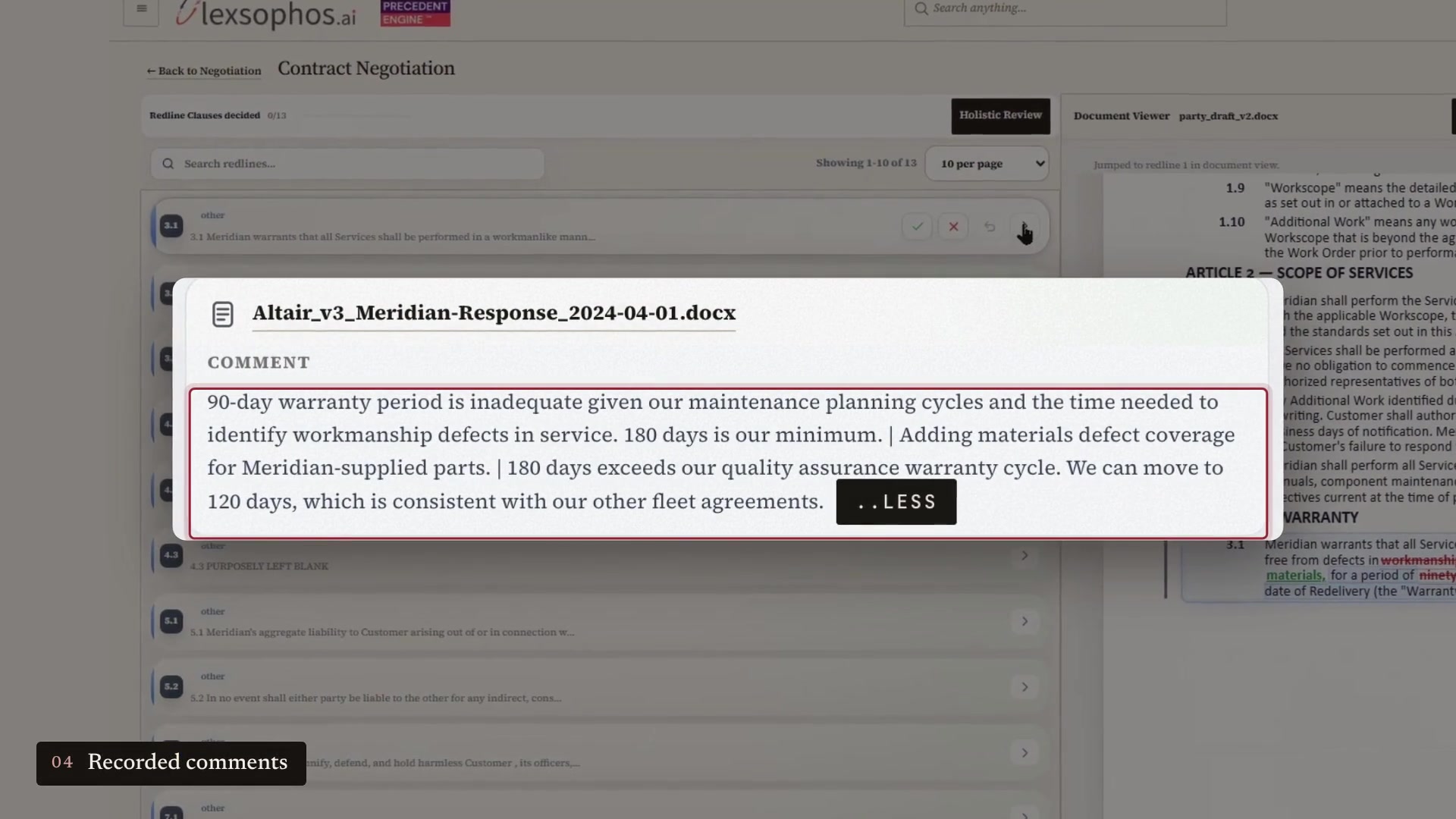
For each match, the workspace shows the earlier clause, the earlier redline, a summary of what changed and the name of the source file, so you can open the original. Where your negotiator recorded a reason in a comment, the match shows that comment too.
You then accept, reject or modify each change. Lexsophos can draft a reply comment that uses your earlier position, and it can review the requested changes together to show where one change affects another. When you are done, you download the next version as a Word document with your decisions applied as tracked changes, ready to send.
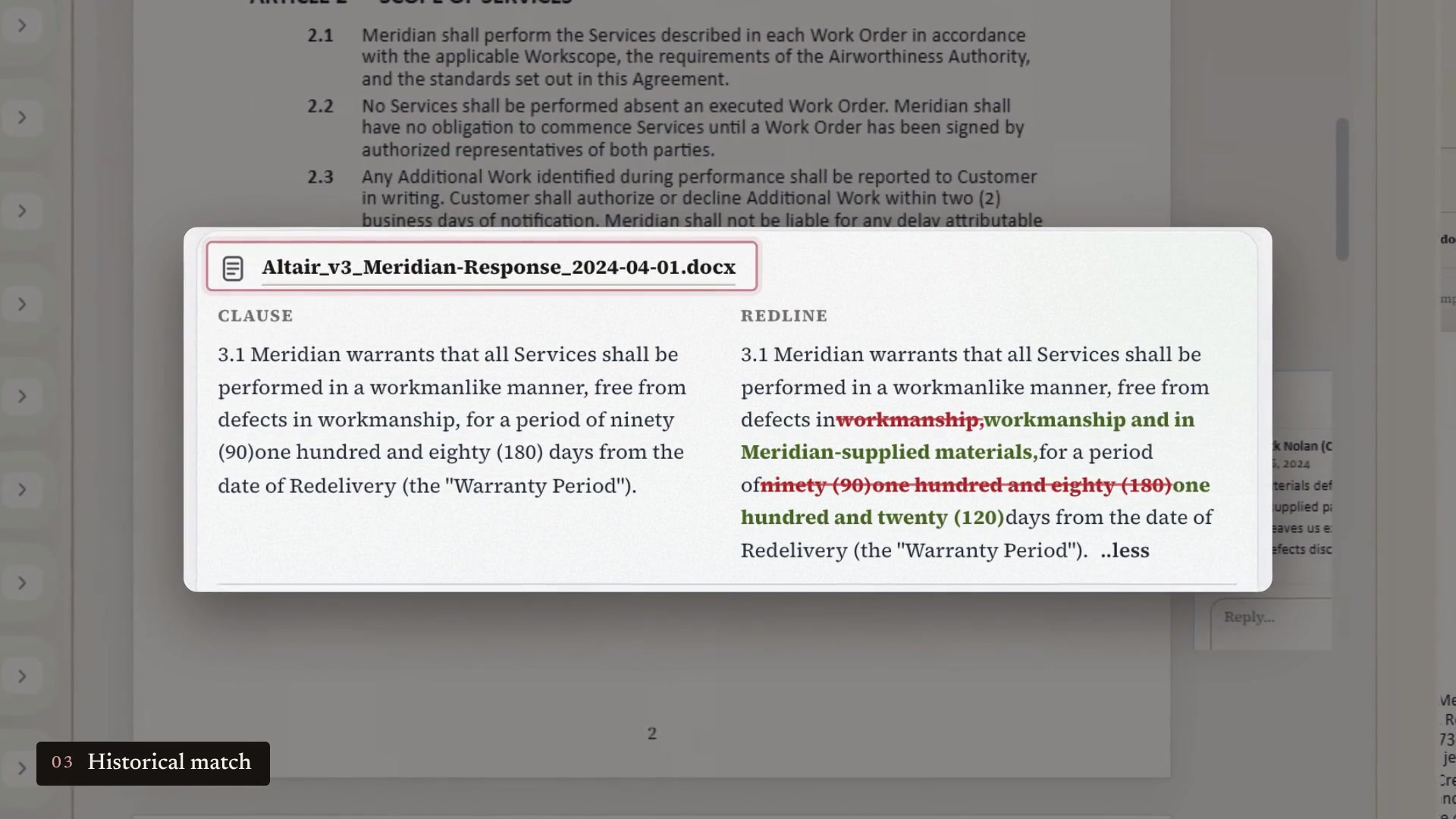
In the sample negotiation we use for walkthroughs, the warranty request returns an earlier deal with a different customer, who asked for 180 days. The team countered at 120 and the customer accepted. The match also shows the comment the team sent at the time: 180 days went beyond its quality assurance warranty cycle, and 120 days was consistent with its other fleet agreements. That is the information the team needs before it replies.
Why does the reason matter as much as the result?
A past outcome on its own can mislead. A team may have accepted 120 days in one deal because it won something else in the same negotiation. Seeing the comment and the source document lets your team judge whether the earlier position still applies. Our posts on liability caps and governing law work through what to check before reusing an earlier position.
Version history shows what changed. The comment shows why, but only if someone wrote it down. Lexsophos shows the comment wherever one exists, and it is worth asking your negotiators to explain significant concessions in a comment, so the next person has the reason as well as the result.
Lexsophos shows what was decided before and why. Your team decides what fits the agreement in front of it, under today's instructions and approval requirements.
Does Lexsophos replace a CLM?
No. Lexsophos works alongside a CLM, or on its own if you do not have one. Your CLM remains the system of record for the signed agreement, its approvals and its obligations. Lexsophos handles the negotiation itself, and the agreed Word document goes into your repository the way it does today. Lexsophos does not need a connection to your CLM.
How does Lexsophos fit with the tools you already use?
Lexsophos is a separate workspace. Here is what changes and what does not.
Word stays the exchange format
Lexsophos handles Word documents: Word in, Word out. Your counterparty receives a Word document with tracked changes, as it does now. The comparison and decisions happen in the Lexsophos workspace, which uses the review conventions your lawyers know: markup views and accept or reject on each change.
No data migration from your CLM
You upload Word files you already have, and you choose which past negotiations to load. Our guide to which Word files to prepare for a Lexsophos evaluation explains what to gather.
Your current process stays in place
Intake, approvals, signature and the signed agreement stay where they are.
You can start small
One agreement type and the counterparties you negotiate with most often is enough to see whether it is useful.
Your data stays separate
Each customer environment serves a single organization on AWS, your agreements are not used to train AI models and your administrator can purge the environment's contract data. Our security page has the details.
One thing to know before you start: Lexsophos works best when you have the earlier Word versions, with their tracked changes and comments. If your team kept only signed PDFs, there is less negotiation history to work with.
Questions to ask any contract tool about negotiation history
- Can it compare a new redline with the versions, tracked changes and comments from earlier negotiations?
- Can it show the comment that explained a past position, as well as the position itself?
- Can you see how a clause was handled with this specific counterparty?
- Does each suggestion link to the source document, so your team can check it?
Frequently asked questions
What is contract negotiation software?
Contract negotiation software helps a team respond to a counterparty's proposed changes. Lexsophos compares each proposed change with how your organization handled similar requests in past negotiations, then produces the next Word version with your decisions as tracked changes.
What is the difference between CLM and contract intelligence?
A CLM platform manages the contract process, from request and approval to signature, storage and renewal. Contract intelligence, as Lexsophos uses the term, means putting what your organization learned in past negotiations to work on the contract you are negotiating now.
Does Lexsophos work with Microsoft Word?
Yes. Lexsophos is a separate web workspace that handles Word documents. You load Word files with tracked changes and comments, and you download the next version as a Word document with your decisions applied as tracked changes.
Does Lexsophos replace our CLM?
No. It works alongside a CLM or on its own. Your CLM remains the system of record for signed agreements.
What files does Lexsophos need?
Earlier negotiations as Word files, ideally the baseline, each version exchanged and the final, with tracked changes and comments.
Is our contract data used to train AI models?
No. Your agreements are processed for analysis only and are not used to train AI models. See our security page for hosting and retention details.
Become a pilot customer
We are taking on pilot customers among aviation lessors, MROs, financiers and airlines. If your team negotiates the same agreement types with the same counterparties, request a 30-minute walkthrough. We will show you the workspace with the warranty example using illustrative files, and you can decide from there whether a pilot makes sense for your team. You do not need to send us your contracts.
Or see what a pilot includes at lexsophos.ai/pilot.