
Lexsophos is contract redlining software for aviation legal and contracts teams that works with Microsoft Word. You load your earlier negotiations as Word files, compare each new redline with how your team handled the same request before, and download the next version as a Word document with your decisions applied as tracked changes.
If your legal team negotiates in Word, the first thing it will ask about a new contract tool is whether it has to change how it works. Your counterparty still receives a Word document with tracked changes, and your lawyers can still open the earlier agreements in Word. What Lexsophos adds is the comparison with your past negotiations, in a workspace you use between the redline arriving and your reply going out.
What is contract redlining software?
Contract redlining software helps a team review and respond to proposed changes in a contract draft, which in most negotiations arrive as tracked changes in a Word document. Some tools work inside Word as an add-in. Others are separate workspaces that take the Word file in and give a Word file back. Lexsophos is the second kind, and it compares each proposed change with your own negotiation history.
Is Lexsophos a Word add-in?
No. Lexsophos is a web workspace that handles Word documents: Word in, Word out. You review the changes in the workspace and download the next version as a Word document.
What do you load into Lexsophos?
You upload earlier negotiations as Word files: the baseline, each version exchanged and the final, with their tracked changes and comments. You choose which negotiations to load. Lexsophos identifies the counterparty and sorts the files by counterparty and agreement type.
You do not need to move anything out of your CLM. The files you load are copies of Word documents you already keep.
What happens when a new redline arrives?
You open a negotiation with your baseline and the counterparty's redline, both as Word files. Lexsophos groups the tracked changes into clause-level decisions and compares each one with how your organization handled the same request before.
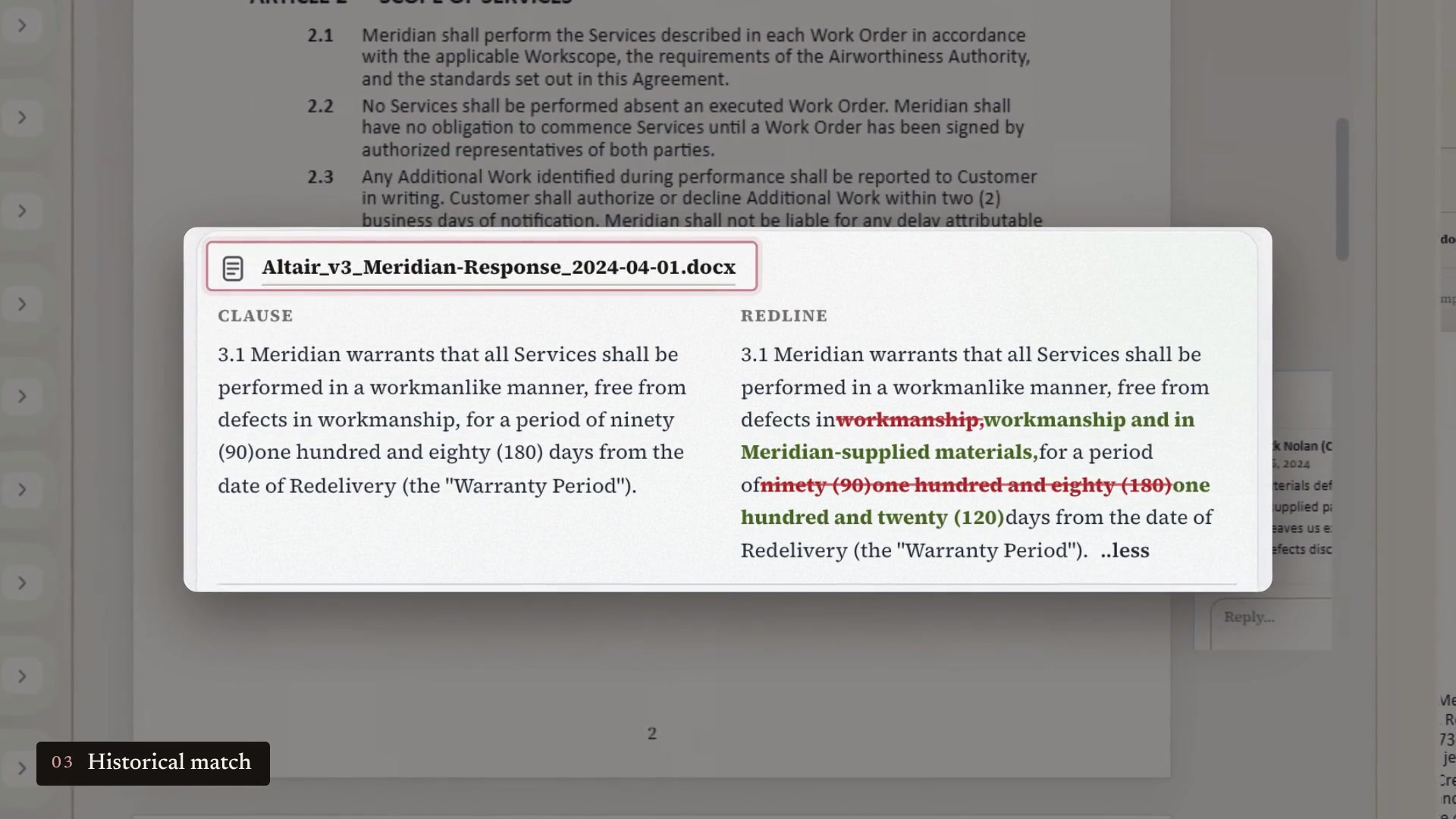
In the sample negotiation we use for walkthroughs, the counterparty asks for a 180-day warranty instead of 90 days. The match shows an earlier negotiation in which a different customer asked for 180 days. The team countered at 120 and the customer accepted. The match also shows the comment the team sent at the time: 180 days went beyond its quality assurance warranty cycle, and 120 days was consistent with its other fleet agreements.
Each match names the Word file it came from, and you can open that file in Word from the match. A lawyer who wants to read the earlier version in full reads it in Word, the same way as any other agreement.
How do you decide each change?
For each change, you accept, modify or reject the language in the workspace. The review uses the conventions your lawyers know from Word: markup views and accept or reject on each change. The match and its comment are shown beside the decision, so the earlier position is in front of you when you make it.
What does your counterparty receive?
When you are done, you download the next version as a Word document with your decisions applied as tracked changes. That is the file you send. Your counterparty reviews it the way it reviews any redline, and it does not need Lexsophos to open it.
What stays the same for your team?
- Your lawyers read and draft agreements in Word.
- Your counterparty sends and receives Word documents with tracked changes.
- Intake, approvals, signature and your CLM work as they do today.
- The signed agreement goes into your repository the way it does now.
What changes?
Before your team replies to a redline, it can see how the same clause was handled in your earlier negotiations, the comment that explained the position at the time and the Word file it came from. Without that, the same step means searching folders or finding whoever handled the last deal.
Lexsophos works best when you have kept the earlier Word versions with their tracked changes and comments. If your team kept only signed PDFs, there is less negotiation history to work with. Our guide to which Word files to prepare for a Lexsophos evaluation explains what to gather.
Frequently asked questions
Do our lawyers have to stop using Word?
No. They load Word files, open earlier agreements in Word and send the next version as a Word document. The comparison and the decisions happen in the Lexsophos workspace.
Is Lexsophos a Word add-in?
No. It is a web workspace that takes Word documents in and produces the next Word version with your decisions as tracked changes.
Does our counterparty need Lexsophos?
No. It receives a standard Word document with tracked changes.
Does Lexsophos replace our CLM?
No. It works alongside a CLM or on its own. Our post on what your CLM does and where your negotiation history fits covers the difference.
Is our contract data used to train AI models?
No. Your agreements are processed for analysis only and are not used to train AI models. See our security page for hosting and retention details.
Become a pilot customer
We are taking on pilot customers among aviation lessors, MROs, financiers and airlines. Request a 30-minute walkthrough and we will show you the warranty example from Word in to Word out, using illustrative files. You can decide from there whether a pilot makes sense for your team. You do not need to send us your contracts.
Or see what a pilot includes at lexsophos.ai/pilot.